Theme
New
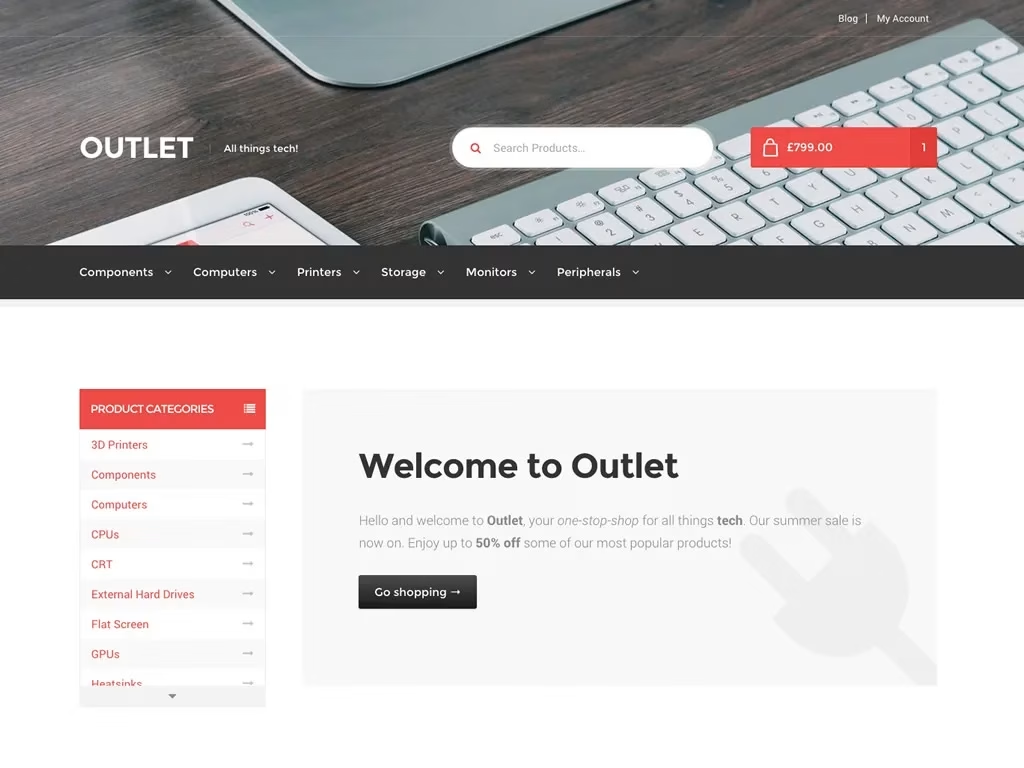
Outlet Storefront Theme for WooCommerce
0.0
|
0 sales
Download Outlet Storefront Theme for WooCommerce, a premium WordPress theme for professional website development. Completely optimized, fast, and fully responsive.
$4.98
Built with:
WordPress
PHP
Key Features Here are the main features of Outlet child theme: Feature Description Clean, tech-oriented design Minimalist / modern, subtle tech styling cues, suited for technology products and accessories. WooCommerce+1 Homepage layout with tabs The theme comes with a homepage layout that prominently displays product categories and products with a tabbed interface. Allows users to switch between product categories from the homepage. WooCommerce+2WooCommerce+2 Custom header image, logo support Lets you upload your header image and logo so you can brand the store. WooCommerce+1 Storefront child theme compatibility Because it’s a child theme, it inherits the core functionality of Storefront (responsiveness, WooCommerce integration etc.). You’ll need Storefront installed and active first. WooCommerce+1 Homepage Menu Location Outlet adds a new menu location titled “Homepage” to display a custom menu alongside homepage content. WooCommerce+1 Support & Updates Comes with updates, improvements, and customer support via WooCommerce. Subscription includes updates. WooCommerce+2WooCommerce+2 Pros — What’s Good Great starting point for tech stores: The design is already tailored for tech / gadget stores, saving you design work. Inherits strengths of Storefront: Because it’s built on the official Storefront theme, compatibility, stability, WooCommerce support tend to be good. Tabbed product-category display on homepage: Gives a good UI / UX for customers to navigate categories directly from homepage. Helps showcase many products without making customers click through many times. Branding flexibility: Ability to upload header images, logo, use custom homepage menu etc helps customization without heavy code. Clean & responsive: Storefront + child theme ensures responsive design; good for mobile users. Good ecosystem / extensions: It works well with Storefront extensions like Powerpack, Footer Bar, Product Hero etc to extend functionality. WooCommerce+1 Cons / Limitations / Things to Watch Out For Design is specialized: Because the aesthetics are for tech shops, if your store is in a very different niche (say fashion, cosmetics, handmade crafts etc.), some design elements might feel out of place, and you may need to adapt heavily. Need for Storefront and possibly paid extensions: To get full styling / features, you may need to buy or activate Storefront extensions. Some functionality (sticky navigation, product hero, footer bar) is via separate Storefront extensions. WooCommerce+1 Limited distinct features beyond layout: It’s essentially a styling / layout child theme. Many of the deeper features (search filters, mega menus, advanced visual features) depend on extensions or custom coding. Updates & compatibility: Since WooCommerce / WordPress evolve, child themes need maintenance. If WooCommerce changes significantly, or Storefront updates majorly, theme might need adjustments. Ensure you keep theme & parent updated. Customization limits: As child theme, custom code in its functions.php may be overridden when it’s updated. Customizations (especially PHP or template changes) should ideally be done via custom plugin or more safely. woo.zendesk.com+1 Fit: When It’s a Good Choice Outlet is a strong choice if: You are selling tech / electronics / gadgets or want a design with that kind of aesthetic. You prefer a theme that looks modern, clean, minimalist, without heavy ornamentation. You want something that integrates well with WooCommerce, and you’re okay using Storefront + child theme setup. You are likely to use or invest in Storefront extensions to unlock features. You want a theme with good support and updates from WooCommerce. Might be less ideal if: Your niche is very different visually (fashion, crafts, food etc.) and you want a more decorative or highly visual design. You don’t want to buy additional extensions and prefer an all-in one theme. Your hosting or team doesn’t handle frequent updates, or you want minimal code and minimal maintenance. Setup / Things to Check Here are some practical things to check/ensure if you use Outlet: Make sure Storefront (parent theme) is installed and activated before installing Outlet. WooCommerce+1 Setup homepage template: Outlet adds its own homepage template and a “Homepage” menu location. Use Appearance → Themes → Customize and set the homepage accordingly. WooCommerce+1 Choose and install any needed Storefront extensions (Powerpack, Product Hero, Footer Bar etc.) to get the demo features. Upload a header image/logo to reflect your brand. Adjust product image sizes; even though Outlet gives references (demo uses certain sizes), matching them helps visuals look sharp. WooCommerce Use caching, optimize images, ensure responsive behavior (test across devices).
Requirements
- WordPress 5.0+ | PHP 7.4+
Compatibility
- WordPress Latest
Supported Browsers
Chrome
Firefox
Safari
Edge
No changelog entries yet.
Outlet Storefront Theme for WooCommerce
Main
Version Latest
627.97 KB
Jun 23, 2026
Login to download
—
0 reviews
You need to log in and purchase this product to leave a review.
LoginNo reviews yet
Be the first to review this product!