
Plugin
New
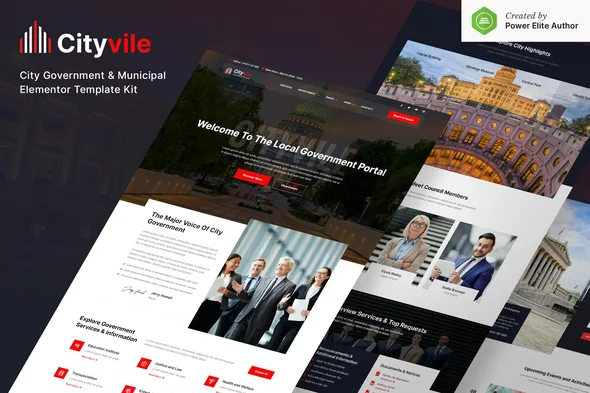
Cityvile - City Government & Municipal Elementor Template Kit
0.0
|
0 sales
Download Cityvile - City Government & Municipal Elementor Template Kit, a premium WordPress plugin for professional web development. Clean, fast, and fully optimized.
$4.98
Cityvile is a modern and clean Elementor Template Kit that perfect for a City Government & Municipal website, government departments, local government, or city portal websites. This template has a professional design with a 100% responsive layout, retina-ready, and very easy to customize because using Elementor so you don’t need a single line of coding!
\n
\nThis template kit includes 16+ carefully crafted templates, you can build your professional-looking company business website just a click away.
\n
\nFeatures:
\n
-
\n
- Using Free Plugins (Elementor Pro is not required) \n
- Modern & Clean Design \n
- 16+ Ready to use templates \n
- Fully Responsive Layout \n
- Retina Ready \n
- Fully Customizable \n
- Cross Browser Compatibility: Chrome, Firefox, Safari, Opera \n
-
\n
- Home \n
- About Us \n
- Services \n
- Departement \n
- Departement Details \n
- Team \n
- Event \n
- FAQ \n
- News \n
- Single News \n
- Contact \n
- MetForm Contact \n
- 404 Page \n
- Header \n
- Footer \n
- Global Theme Style \n
-
\n
- Elementor \n
- Jeg Elementor Kit \n
- Elementor – Header, Footer & Blocks \n
- MetForm \n
-
\n
- Install and Activate the “Envato Elements” plugin from Plugins > Add New in WordPress \n
- Do not unzip \n
- Go to Elements > Installed Kits and click the Upload Template Kit button. \n
- Before importing a template, ensure the Install Requirements button is clicked to activate required plugins \n
- For best results, do not import more than one template at a time. \n
-
\n
- Import the metform block templates \n
- Import the page template where the form appears and right-click to enable the Navigator \n
- Locate and select the Metform widget and click Edit Form. Choose New, then Edit Form. The builder will appear \n
- Click ‘Add Template’ grey folder icon. \n
- Click ‘My Templates’ tab. \n
- Choose your imported metform template, then click ‘Insert’ (click No for page settings). \n
- Once the template is loaded, make any desired customizations and click ‘Update & Close’ The form will appear in the template \n
- Click Update \n
-
\n
- Import the header and footer template \n
- Go to Appearance > Header Footer and click Add New button \n
- Give it a title and select Header, Display on Entire Site and click Publish \n
- Click Edit with Elementor \n
- Click the gray folder icon to access My Templates tab and select the header template to import and Update. \n
- Repeat for Footer \n
No changelog entries yet.
Cityvile – City Government & Municipal Elementor Template Kit
Main
Version 1.0.0
1.57 MB
Jun 23, 2026
Login to download
—
0 reviews
You need to log in and purchase this product to leave a review.
LoginNo reviews yet
Be the first to review this product!