Plugin
New
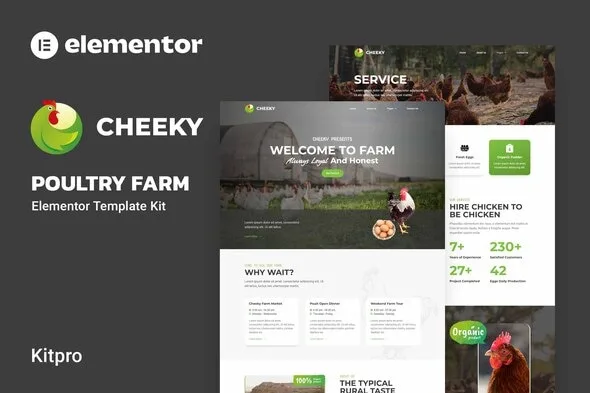
Cheeky - Poultry Farm Elementor Template Kit
0.0
|
0 sales
Download Cheeky - Poultry Farm Elementor Template Kit, a premium WordPress plugin for professional web development. Clean, fast, and fully optimized.
$4.98
Cheeky is an Elementor Template Kit for quickly and easily creating websites for your business using the Elementor Page Builder plugin for WordPress. This is not a WordPress theme. Template Kits contain page content for Elementor page builder. This kit has been optimized for use with the free Hello Elementor theme but may be used with most themes that support Elementor.
\n
\nTemplates
\n
-
\n
- Home \n
- About us \n
- Contact Us \n
- Service \n
- Faq \n
- Product \n
- Team \n
- Pricing \n
- Blog \n
- 404 \n
-
\n
- ElementsKit \n
- Qi Addons For Elementor \n
- Metform \n
- Header & Footer Builder for Elementor \n
-
\n
- Montserrat \n
- Vujahday Script \n
- Nova Mono \n
- Roboto \n
-
\n
- Install and Activate the “Envato Elements” plugin from Plugins > Add New in WordPress \n
- Download your kit file and Do not unzip \n
- Go to Elements > Installed Kits and click the Upload Template Kit button. You may also import automatically by clicking Connect Account to link your Elements subscription, then import under Elements > Template Kits. \n
- Check for the orange banner at the top and click Install Requirements to load any plugins the kit uses \n
- Click import on the Global Kit Styles first \n
- Click Import on one template at a time. These are stored in Elementor under Templates > Saved Templates. \n
- Go to Pages and create a new page and click Edit with Elementor \n
- Click the gear icon at lower-left of the builder to view page settings and choose Elementor Full Width and hide page title \n
- Click the gray folder icon to access My Templates tab and then Import the page you’d like to customize. \n
-
\n
- Import the metform block templates \n
- Import the page template where the form appears and right-click to enable the Navigator \n
- Locate and select the Metform widget and click Edit Form. Choose New, then Edit Form. The builder will appear \n
- Click ‘Add Template’ grey folder icon. \n
- Click ‘My Templates’ tab. \n
- Choose your imported metform template, then click ‘Insert’ (click No for page settings). \n
- Once the template is loaded, make any desired customizations and click ‘Update & Close’ The form will appear in the template \n
- Click Update \n
-
\n
- Import the header and footer template \n
- Go to ElementsKit > Header Footer and click Add New (if prompted with a wizard, you may click Next through it without taking any action) \n
- Title the header, leave Entire Site selected and toggle Activation to On \n
- Click the gray Edit Content button to load the builder \n
- Click the gray folder icon and select the header template to import, select your menu in the nav element and click Update. \n
- Repeat for Footer \n
-
\n
- https://elements.envato.com/collections/JX2LY3M6HA \n
No changelog entries yet.
Cheeky - Poultry Farm Elementor Template Kit
Main
Version 1.0.0
1.55 MB
Jun 23, 2026
Login to download
—
0 reviews
You need to log in and purchase this product to leave a review.
LoginNo reviews yet
Be the first to review this product!